When connecting a Chromebook to external speakers, for example, a smartboard, Audio may default to the device's internal speakers.
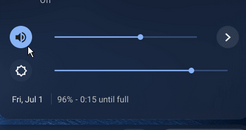
To change this, open the system tray in the bottom right, find the sound control.

Modified on: Thu, 26 Feb, 2026 at 12:00 PM
When connecting a Chromebook to external speakers, for example, a smartboard, Audio may default to the device's internal speakers.
To change this, open the system tray in the bottom right, find the sound control.
Did you find it helpful? Yes No
Send feedback