
- Find a recent report in Documents\My Sims Documents\*Name* where name is your name.
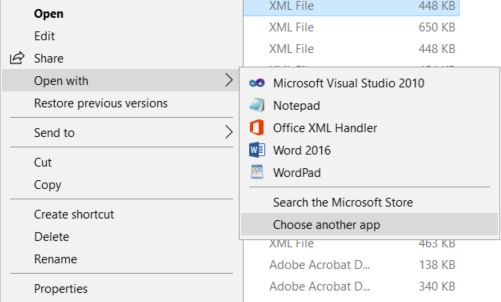
- Right-click to access the context menu.
- Mouse to Open With, and another menu will appear.
- Select Choose Another App, as shown here:
- Make sure the tick box at the bottom saying "Always use this app to open .xml files" is selected, as below:
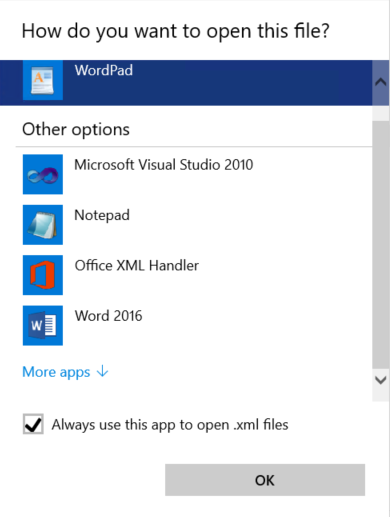
- Click on Word 2016 above and click OK.
This should now associate the .xml file type with Word and your reports will now open and display properly.
SIMS Linked Documents XML issue Print
Created by: Stuart Knights
Modified on: Wed, 31 Jan, 2024 at 9:45 AM
Did you find it helpful? Yes No
Send feedbackSorry we couldn't be helpful. Help us improve this article with your feedback.