
Step 1 - In a browser navigate to https://homeaccess.cathedralschoolstrust.org
Step 2 - Login using your School computer login details.
Step 3 - Once Logged In please select the school farm icon for your school. This will download a .rdp file which you can save somewhere memorable for future use
Skip to Here if you have the .rdp file
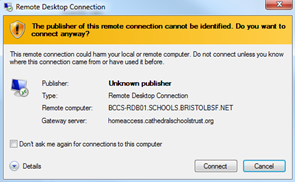
Step 4 - Double click on the .rdp file downloaded and check the “Don’t ask me again..” box and then on the connect button.
Step 5 - Enter your computer username in the following format schools\Your username and then your password as normal. Check the “Remember Me” box if you would like your details remembered on the machine, do not do this on shared devices.